
This was posted on microsoft website by the Windows people itself.........
(many people in the US had geniune win OS but were getting this 'NOT GENIUNE' watermark on their desktop , so as a result of thier numerous complaints....we have this....)
It was posted for Win XP but will work for vista and win7 also
- Launch Windows Task Manager.
- End wgatray.exe process in Task Manager.
- Restart Windows XP in Safe Mode.
- Delete WgaTray.exe from C:\Windows\System32.
- Delete WgaTray.exe from C:\Windows\System32\dllcache.
- Launch RegEdit.
- Browse to the following location: HKEY_LOCAL_MACHINE\SOFTWARE\Microsoft\Windows NT\CurrentVersion\Winlogon\Notify
- Delete the folder WgaLogon and all its contents
- Reboot Windows XP.
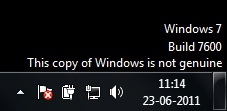
But the latest version of the WGN tool is a little tricky to handle. It will pop up again as soon as you end it from the task manager and while it is running in the memory, you can’t delete it too.
Here is how I did it :
- Ignore Step #2 of ending wgatray.exe before restarting to Safe Mode as it serves no purpose.
- At Step #4, wait on the deletion confirmation dialog box and then open task manager to end wgatray.exe
- When you are again prompted for a confirmation for terminating the process, align that confirmation box over the delete confirmation box.
- Press Yes on the Task Manager prompt and then quickly press Yes on the deletion confirmation. (You need to repeat this if you miss it)
- If you did it quickly then you will be able to delete the file.
- Step #5 can be missed. I was able to do it without the Step #5.
- Complete Step 6 to 9 as instructed
feedback@technoholics.co.in
